
tldr: GPU becomes unresponsive under high load on stock settings while audio continues. Putting power maximum to 85% negates the issue. GPU temperatures spike high but do not correspond with the timings of the crash. Windows throws LiveKernelEvents 0x141 and two 0x1b8 upon crash. Can run 3DMark Steel Nomad (GPU stresstest) but not Time Spy/Fire strike without crashing.
I have never done an RMA before and would appreciate reassurances just as much as help.
Specs:
GPU: MSI GeForce RTX 5060 Ti 16G VENTUS 3X OC
PSU: Corsair RM750e (80 PLUS Gold)
CPU: AMD Ryzen 7 9800X3D 8-core
Cooler: MSI MAG CoreLiquid I360
RAM: Corsair Vengeance 32GB (2x16GB) DDR5 6000Mhz
Motherboard: MSI MAG B850M MORTAR WIFI
Case: Thermaltake 300 Matcha Green (aint she a beaut)
SSD: Crucial PCIe 3.0 NVMe M.2 SSDS 4TB
Screen 1: LG 29UM57
Screen 2: MSI MAG401QR
Operating system: Windows 11 Pro 10.0.26200
Driver: 610.88 (Jul 28)
Original discovery
While playing Black Desert Online on medium-high settings the screen would suddenly turn off and display that no signal is found while the audio will keep on working. Discord calls continue without issue. The pc RGB stays on and the fans are spinning. The only way to resolve it is to restart the pc. No framerate issue or noticeably throttle before the crash. No particularity heavy occurrences. Time until it crashes appears longer when on extremely low settings, but still happens on occasion. Time until it crashes on high+ settings is anywhere between 3 minutes to ~2 hours and otherwise runs surprisingly smooth.
The GPU has not been in another pc before this. Components were almost all bought brand new around December 2025. The PSU was purchased in december 2024 but not used in between. Ram was secondhand but tests fine. The GPU has been running on stock values and has not been altered with the exception of the fan speed and power changes altered during testing.
Steps taken:
Physical inspection
I reseated the GPU. No damage whatsoever detected on the pins or casing. I checked all the cables, angle of the cables, and changed to another pcie slot on the PSU. I changed the main screen to another DP port. I tested the power of the screens, and while only using 1 screen. Double checked that the PSU can sustain the GPU.
GPU reset
Win + Ctrl + Shift + B does absolutely nuthin man. I cry.
NVIDIA GPU UEFI Firmware Update Tool v2.0
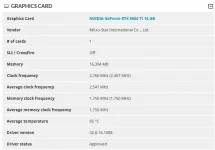
I installed GPU-Z to check the Bus Interface to see if it faultily thinks its x16. This displays PCiE x8 5.0 @8 1.1.
I ran the update for blank screens on startup for the GPU series, just in case. It just mentioned that I did not need the firmware update when I ran it.
DDU
I first updated the drivers to the newest version normally. When this didn’t have an effect I wiped the drivers with DDU and reinstalled the newest version fresh.
HWiNFO64
I played BDO on the highest graphics while running the sensors-only logging. I used Chat-GPT to analyze the files. Most values seemed normal although it noted that the GPU temperature sometimes peaks to 87.9°C and 108.9°C on the hotspot. The temperature spikes do not occur around the time of the crash, but are higher than the card advertises (87). I removed the case panels, moved the pc in an even more open area and used the NVIDIA App to turn the fans manually to the max. Room temperature 26°C. The temperatures remained high with peaks of 88.5°C/108.6°C. I do not think this is the main issue, but maybe still good to mention. VRAM temperatures were fine. I ran this test a number of times but findings are similar. GPU power-connector voltage was ~12.2 V.
Chat GPT : At about 19:00:09–19:00:12, several sensor readings stop changing normally, and at 19:00:14 the NVIDIA telemetry effectively falls apart:
Windows kernel live dump
3 errors were recorded at the time of crash.
0x141 VIDEO_ENGINE_TIMEOUT_DETECTED
both AMD and NVIDIA miniports generate 0x1B8 black-screen dumps
These seem important but I do not know how to relay the important bits.
GPU Settings
I used the NVIDIA app debug mode, which removes all currently applied overclocking, just in case. No change.
Low Power Test
In the NVIDIA App I changed the power to 85%. The temperature issue remained. All crashed stopped occurring entirely!!! I tested it on 95% and 90%. The crashes occur at lesser intervals, but still commonly.
BIOS-update
I flashed the latest bios. The previous bios was only a year old because its a newer motherboard. Additionally, although all components are capable of gen5, I tested if gen4 would give more stability.
3DMark
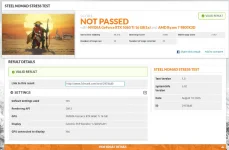
I changed back power mode to 100% and ran Steel Nomad with 20 loops. There were no crashes! It did however fail the GPU test by being just under 97% (96.3%) for dropped frames.
I ran Fire Strike Extreme at 100% power. It crashed within the first loop.
I ran Time Spy (DirectX12) at 100% power. It crashed within the first loop.
I ran Time Spy at 85% power. No crash.
I ran Time Spy Extreme on 85% power. No crash.
I had HWiNFO64 record all the runs. I re-ran some with same results. I was unable to attach the filetype to this post but I can share them if requested.
I am at a complete loss for what more I might have to test, and have been delaying sending an RMA for 3 weeks now in the fear of getting a negative response. My anxiety is overwhelming but I do recognize that the card should not be this unstable at stock values.
I would appreciate anyone’s thought on what other info to include or what more to test. I am in over my head and grasping at straws at this point. Please help T.T
I have never done an RMA before and would appreciate reassurances just as much as help.
Specs:
GPU: MSI GeForce RTX 5060 Ti 16G VENTUS 3X OC
PSU: Corsair RM750e (80 PLUS Gold)
CPU: AMD Ryzen 7 9800X3D 8-core
Cooler: MSI MAG CoreLiquid I360
RAM: Corsair Vengeance 32GB (2x16GB) DDR5 6000Mhz
Motherboard: MSI MAG B850M MORTAR WIFI
Case: Thermaltake 300 Matcha Green (aint she a beaut)
SSD: Crucial PCIe 3.0 NVMe M.2 SSDS 4TB
Screen 1: LG 29UM57
Screen 2: MSI MAG401QR
Operating system: Windows 11 Pro 10.0.26200
Driver: 610.88 (Jul 28)
Original discovery
While playing Black Desert Online on medium-high settings the screen would suddenly turn off and display that no signal is found while the audio will keep on working. Discord calls continue without issue. The pc RGB stays on and the fans are spinning. The only way to resolve it is to restart the pc. No framerate issue or noticeably throttle before the crash. No particularity heavy occurrences. Time until it crashes appears longer when on extremely low settings, but still happens on occasion. Time until it crashes on high+ settings is anywhere between 3 minutes to ~2 hours and otherwise runs surprisingly smooth.
The GPU has not been in another pc before this. Components were almost all bought brand new around December 2025. The PSU was purchased in december 2024 but not used in between. Ram was secondhand but tests fine. The GPU has been running on stock values and has not been altered with the exception of the fan speed and power changes altered during testing.
Steps taken:
Physical inspection
I reseated the GPU. No damage whatsoever detected on the pins or casing. I checked all the cables, angle of the cables, and changed to another pcie slot on the PSU. I changed the main screen to another DP port. I tested the power of the screens, and while only using 1 screen. Double checked that the PSU can sustain the GPU.
GPU reset
Win + Ctrl + Shift + B does absolutely nuthin man. I cry.
NVIDIA GPU UEFI Firmware Update Tool v2.0
I installed GPU-Z to check the Bus Interface to see if it faultily thinks its x16. This displays PCiE x8 5.0 @8 1.1.
I ran the update for blank screens on startup for the GPU series, just in case. It just mentioned that I did not need the firmware update when I ran it.
DDU
I first updated the drivers to the newest version normally. When this didn’t have an effect I wiped the drivers with DDU and reinstalled the newest version fresh.
HWiNFO64
I played BDO on the highest graphics while running the sensors-only logging. I used Chat-GPT to analyze the files. Most values seemed normal although it noted that the GPU temperature sometimes peaks to 87.9°C and 108.9°C on the hotspot. The temperature spikes do not occur around the time of the crash, but are higher than the card advertises (87). I removed the case panels, moved the pc in an even more open area and used the NVIDIA App to turn the fans manually to the max. Room temperature 26°C. The temperatures remained high with peaks of 88.5°C/108.6°C. I do not think this is the main issue, but maybe still good to mention. VRAM temperatures were fine. I ran this test a number of times but findings are similar. GPU power-connector voltage was ~12.2 V.
Chat GPT : At about 19:00:09–19:00:12, several sensor readings stop changing normally, and at 19:00:14 the NVIDIA telemetry effectively falls apart:
- GPU fan suddenly reports 0 RPM
- hotspot becomes 0.0°C
- memory junction becomes 0.0°C
- individual VRAM sensors suddenly report nonsensical 470 values
- GPU-memory-clock telemetry changes abnormally
- other values remain frozen/stale
Windows kernel live dump
3 errors were recorded at the time of crash.
0x141 VIDEO_ENGINE_TIMEOUT_DETECTED
both AMD and NVIDIA miniports generate 0x1B8 black-screen dumps
These seem important but I do not know how to relay the important bits.
GPU Settings
I used the NVIDIA app debug mode, which removes all currently applied overclocking, just in case. No change.
Low Power Test
In the NVIDIA App I changed the power to 85%. The temperature issue remained. All crashed stopped occurring entirely!!! I tested it on 95% and 90%. The crashes occur at lesser intervals, but still commonly.
BIOS-update
I flashed the latest bios. The previous bios was only a year old because its a newer motherboard. Additionally, although all components are capable of gen5, I tested if gen4 would give more stability.
3DMark
I changed back power mode to 100% and ran Steel Nomad with 20 loops. There were no crashes! It did however fail the GPU test by being just under 97% (96.3%) for dropped frames.
I ran Fire Strike Extreme at 100% power. It crashed within the first loop.
I ran Time Spy (DirectX12) at 100% power. It crashed within the first loop.
I ran Time Spy at 85% power. No crash.
I ran Time Spy Extreme on 85% power. No crash.
I had HWiNFO64 record all the runs. I re-ran some with same results. I was unable to attach the filetype to this post but I can share them if requested.
I am at a complete loss for what more I might have to test, and have been delaying sending an RMA for 3 weeks now in the fear of getting a negative response. My anxiety is overwhelming but I do recognize that the card should not be this unstable at stock values.
I would appreciate anyone’s thought on what other info to include or what more to test. I am in over my head and grasping at straws at this point. Please help T.T
Bijlagen
Laatst bewerkt:

